

Introduction
In the realm of software development and project management, producing comprehensive design documents like UMLs, relationship diagrams, and sequence diagrams is not just a routine task but a critical one. These documents ensure that all stakeholders have a clear understanding of the project’s structure and workflow, facilitating better communication and more effective project execution. However, the traditional methods of creating these documents are often time-consuming and prone to errors.
Enter generative AI, a powerful ally in streamlining these processes. This blog post explores how generative AI, particularly when integrated with tools like PlantUML, HTML, and Python, revolutionizes the creation of technical drawings and project documentation. By automating and enhancing accuracy, generative AI not only saves time but also significantly improves the quality of the outputs.
Challenges in Design Documentation
Technical documentation, such as Unified Modeling Language (UML) diagrams, relationship diagrams, and sequence diagrams, are foundational in software engineering. They provide a visual representation of systems, databases, and processes, which is essential for both understanding and constructing complex software architectures. However, creating these diagrams manually can be fraught with difficulties:
- Time-Consuming Processes: Traditional methods of drawing these diagrams require meticulous attention to detail and can take considerable time, especially for large projects with complex requirements.
- Consistency Issues: Maintaining consistency across various diagrams and updates can be challenging, particularly when multiple team members are involved or when projects undergo significant changes.
- Error-Prone: Manual diagramming is susceptible to human error, leading to potential miscommunications and costly mistakes in the development process.
- Skill Dependency: Proficiency in diagramming tools and understanding of complex diagramming standards are required, which can be a barrier for new team members or non-specialists.
These challenges highlight the need for more efficient and less error-prone tools. Generative AI offers a promising solution by automating the generation of these diagrams, ensuring consistency, reducing errors, and saving time.
Generative AI can interpret simple text descriptions or code to produce precise and detailed diagrams. This capability not only speeds up the documentation process but also ensures that diagrams are easily updated and modified, keeping pace with project changes without the usual delays and inconsistencies.
Introducing PlantUML
PlantUML is a powerful open-source tool that allows users to create various types of diagrams, including UML diagrams, sequence diagrams, and Gantt charts, using a plain text language. The ease of use and flexibility offered by PlantUML makes it an invaluable resource for developers, project managers, and designers aiming to streamline their documentation processes.
Key Features of PlantUML:
- Simplicity: PlantUML uses a straightforward syntax to define elements and relationships, making it accessible even to those who are not familiar with graphic design tools.
- Speed: Diagrams can be generated quickly, updated easily, and integrated into documentation with minimal effort, which is especially beneficial in agile environments where changes are frequent.
- Versatility: PlantUML supports a wide range of diagram types, making it a versatile tool for all kinds of technical documentation needs.
- Integration: It can be integrated into various platforms and tools, including wikis, cloud services, and IDEs (Integrated Development Environments), facilitating collaborative work.
Benefits of Using PlantUML:
- Consistency: Automatically generates diagrams that are stylistically consistent, ensuring that all documentation looks professional and is easy to understand.
- Accuracy: Reduces the risk of human error by translating text into diagrams, ensuring that the visual representations are accurate reflections of the textual descriptions.
- Collaboration: Text-based diagrams make version control and collaboration easier, as source code for diagrams can be shared and edited by team members just like any other code file.
By addressing the common pain points in diagram generation, PlantUML not only enhances productivity but also improves the quality of project documentation. Furthermore, its compatibility with generative AI techniques enables even more dynamic and automated solutions, tailored to the specific needs of a project.
Practical Examples with PlantUML
PlantUML is not only powerful but also user-friendly, making it an excellent choice for anyone looking to generate clear, concise, and consistent technical diagrams. Here, we’ll explore how to create several types of diagrams using PlantUML, each serving different aspects of software design and project management.
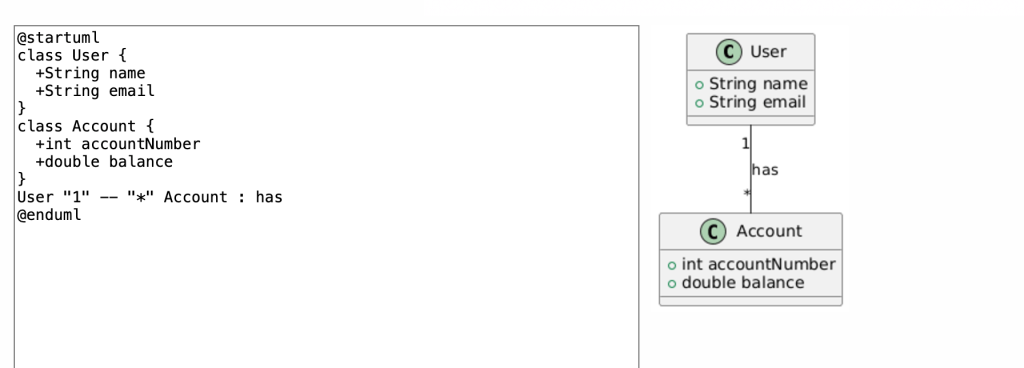
1. Creating a UML Diagram:
- Objective: Illustrate the structure of a software system with classes and interfaces.
- Explanation: This PlantUML code generates a class diagram showing a
Userclass and anAccountclass with a relationship indicating that a user can have multiple accounts.
@startuml
class User {
  +String name
  +String email
}
class Account {
  +int accountNumber
  +double balance
}
User "1" -- "*" Account : has
@enduml
2. Creating a Sequence Diagram:
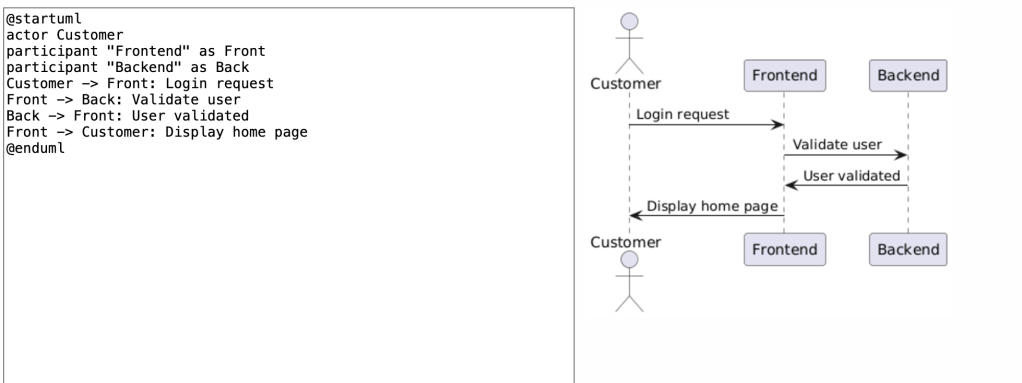
- Objective: Visualize the interaction between objects over time in a particular scenario.
- Explanation: This sequence diagram details the steps involved when a customer logs into a system, from the initial request to the final response.
@startuml
actor Customer
participant "Frontend" as Front
participant "Backend" as Back
Customer -> Front: Login request
Front -> Back: Validate user
Back -> Front: User validated
Front -> Customer: Display home page
@enduml
3. Generating a Gantt Chart:
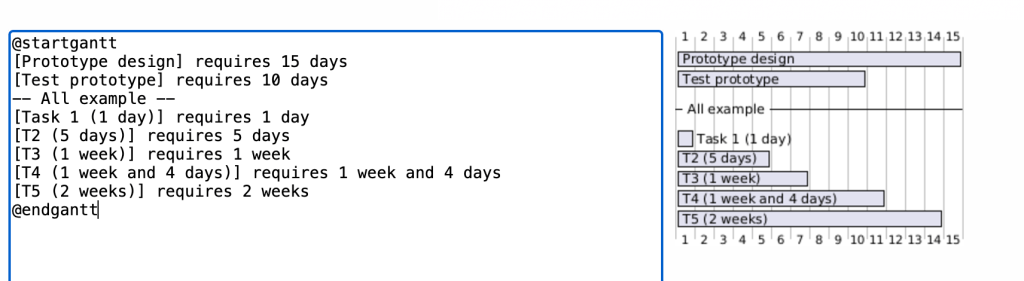
- Objective: Plan and display project timelines and milestones.
- Explanation: This Gantt chart outlines the major phases of a project, showing dependencies and durations for each task.
@startgantt
[Prototype design] requires 15 days
[Test prototype] requires 10 days
-- All example --
[Task 1 (1 day)] requires 1 day
[T2 (5 days)] requires 5 days
[T3 (1 week)] requires 1 week
[T4 (1 week and 4 days)] requires 1 week and 4 days
[T5 (2 weeks)] requires 2 weeks
@endgantt
4. Creating a Database Relationship Diagram:
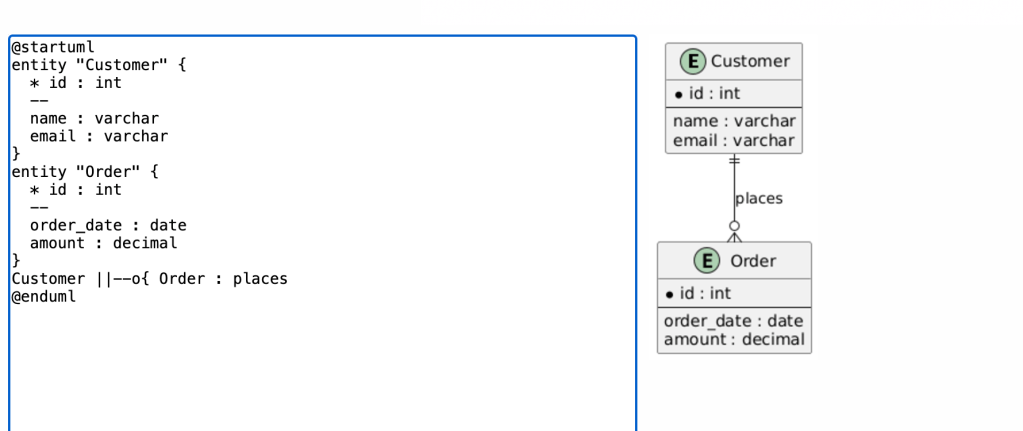
- Objective: Display the relationships between tables in a database.
- Explanation: This diagram models a simple database showing customers and their orders, highlighting the one-to-many relationship.
@startuml
entity "Customer" {
  * id : int
  --
  name : varchar
  email : varchar
}
entity "Order" {
  * id : int
  --
  order_date : date
  amount : decimal
}
Customer ||--o{ Order : places
@enduml
By using PlantUML to create diagrams like these, developers and project managers can significantly reduce the time and effort typically required to produce essential technical documentation. This streamlined approach not only aids in maintaining project clarity but also enhances communication across all project stakeholders.
Plantuml Official Website provides more detailed documents and examples.
Integrating AI for Enhanced Automation
The integration of AI technology into the process of generating technical diagrams and project documentation represents a major leap forward in the capabilities of design and project management tools. By using AI, teams can automate complex processes, ensure higher accuracy, and save considerable time.
Using AI to Generate Technical Drawings:
- Objective: Automate the creation of detailed and accurate technical drawings from textual descriptions or code.
- Benefits: AI can quickly interpret and execute commands to produce diagrams, reducing manual input and the associated risks of errors.
- Example Application: Using AI prompts to generate PlantUML code for complex diagrams, which are then automatically rendered into visual formats.
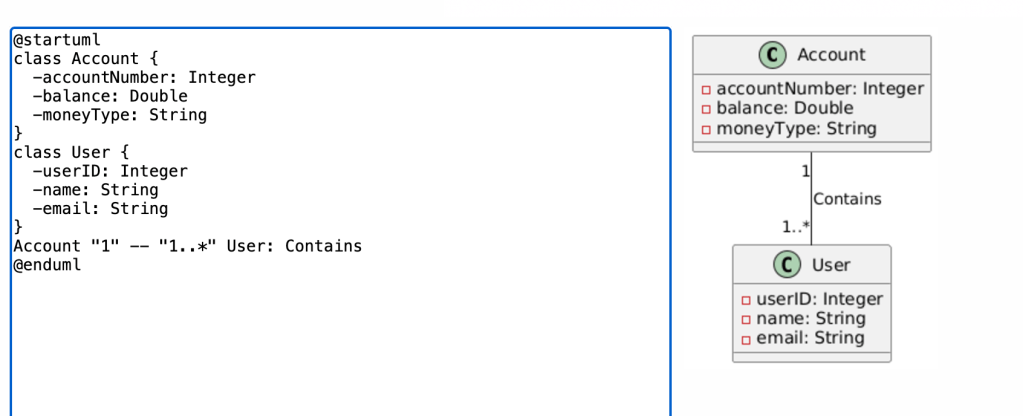
Case Study: AI-Generated PlantUML Code for Class Diagrams
Outcome: The AI generates the following PlantUML code, which can be directly used to render the diagram:
Scenario: A software development project requires a class diagram to define the structure of a new banking application.
AI Prompt: “Suppose you are an experienced PlantUML user as well as a software architect. Follow my instructions to generate the correct PlantUML source code for generating two classes: Account, which includes different money types, the amount, and uses the account number as a key; and User, which contains general bank user information and connects with Account.”
@startuml
class Account {
  -accountNumber: Integer
  -balance: Double
  -moneyType: String
}
class User {
  -userID: Integer
  -name: String
  -email: String
}
Account "1" -- "1..*" User: Contains
@enduml
Enhancing Collaboration and Updates:
- AI-generated source codes for diagrams can be easily shared among team members, who can then update or modify them as needed, ensuring that documentation keeps pace with project developments without requiring extensive manual revisions.
By integrating AI into their workflow, project teams can not just simplify the creation of technical documentation but also enhance the collaboration and adaptability of documentation to changing project needs. This approach not only saves time but also contributes to maintaining high-quality outputs throughout the project lifecycle.
Conclusion
Throughout this blog post, we’ve explored the significant advantages that generative AI, when integrated with tools like PlantUML, HTML, and Python, brings to the field of technical documentation and design. These technologies collectively enhance the efficiency, accuracy, and quality of project outputs, transforming traditional approaches to project management and documentation.
Key Takeaways:
- Enhanced Efficiency: The automation capabilities of generative AI save considerable time in creating and updating technical drawings and documentation, allowing teams to focus on more strategic tasks.
- Improved Accuracy: AI reduces human errors by automating the generation of technical diagrams and project documentation, ensuring consistency across all materials.
- Increased Collaboration: Tools like PlantUML and Python scripts facilitate easier sharing and updating of documents and drawings, enhancing teamwork and communication.
Future Outlook:
As technology evolves, the role of AI in technical documentation and design is expected to grow even more prominent. Future developments may include:
- Advanced AI Assistants: More sophisticated AI tools that can understand and execute complex design and documentation tasks with minimal human input.
- Integrated Development Environments (IDEs): Enhanced IDEs that seamlessly incorporate AI to provide real-time assistance, error correction, and suggestions for improvements.
- Cross-Platform Compatibility: Further integration of these tools across different platforms, making it easier to maintain a unified workflow regardless of the software environment.
The potential for AI to further streamline and enhance technical documentation and project management is immense. By embracing these technologies, professionals can not only keep pace with industry advancements but also leverage these tools to drive innovation and efficiency in their projects.
By understanding and utilizing the capabilities of generative AI, professionals in software development, project management, and related fields can ensure that they are at the forefront of technological advancements, prepared to tackle the challenges of tomorrow.

 Johngai’s Tech Forge